Rust static analysis #
Static analysis involves analyzing source code without executing it.
Clippy #
Clippy is the fundamental linter. Just use it.
Clippy lints are categorized into groups and levels. Groups categorize lints by the types of issues they detect. Levels indicate what to do when a lint finds an issue:
- Allow: Ignore the issue
- Warn: Print a message to stderr
- Deny: Return an error code (useful in CI pipelines)
Clippy is a wrapper over the rustc compiler, so when Clippy is run, it executes
its own set of lints in addition to rustc’s. These lints are similarly categorized and can be controlled with the same flags and configuration options.
For one-off security reviews, you want to get indicators of buggy code. For that, use the default configuration. It enables selected warnings and deny lints:
cargo clippy
For audits of very mature codebases, you want to enable more groups:
cargo clippy -- -W clippy::pedantic -W clippy::nursery
Finally, you can get them all (rustc allow lints must be enabled one by one, and some require additional features):
cargo clippy -- \
 -Zcrate-attr="feature(non_exhaustive_omitted_patterns_lint)" \
 -Zcrate-attr="feature(strict_provenance)" \
 -Zcrate-attr="feature(multiple_supertrait_upcastable)" \
 -Zcrate-attr="feature(must_not_suspend)" \
 -W $(rustc -W help | grep '  allow' | tr -s ' ' | cut -d' ' -f2 | awk 'ORS=" -W"') \
 clippy::pedantic -W clippy::nursery -W clippy::restriction -A dead_code
These are our favorite lints:
arithmetic_side_effects: Detects potential side effects of arithmetic operations (e.g., integer overflows, division by zero)string_slice: Detects potential slices that do not align with Unicode scalar valuemust_use_candidate: Checks for unused#[must_use]candidates# WARNING: The next command modifies files! cargo clippy --fix --allow-dirty -- -W clippy::must-use-candidate cargo check --all-targets
If Clippy produces a lot of results, you may want to output findings in SARIF format and use
SARIF Explorer to review them in a code editor. Use the third-party
clippy-sarif tool for the task:
cargo clippy --message-format=json | clippy-sarif
For continuous use, such as in a CI/CD pipeline, you want to minimize false positives and focus on the important lints. For that, follow these guidelines:
- Use the default Clippy configuration.
- Enable recommended
clippy::restrictionlints (see the example below). - Enable selected lints from
clippy::pedanticgroups (these should be enabled case by case depending on your project). - Turn warnings into errors so that CI/CD fails on any issue.
- Add
#[allow(..)]attributes in the code to silence specific findings of enabled lints when really needed. Make sure to comment why the lint was disabled in the specific location.
cargo clippy -- \
 -Dwarnings -A clippy::style -W clippy::arithmetic-side-effects \
 -W clippy::string_slice -W clippy::infinite_loop \
 -W clippy::float_cmp_const
 # then enable style and pedantic like -W clippy::same-item-push -W clippy::cast_lossless
You can contribute new lints to Clippy. To do so, follow the official guidance.
To stop Clippy from producing warnings for tests, use the following configuration (e.g., in the
clippy.tomlfile):allow-expect-in-tests = true allow-panic-in-tests = true allow-unwrap-in-tests = true
Dylint #
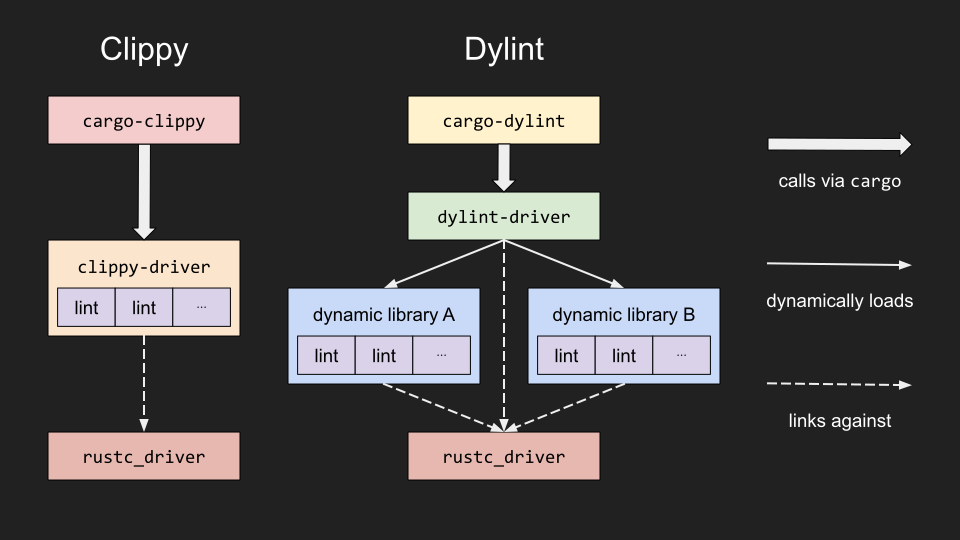
Dylint runs lints from dynamic libraries named by the user, allowing developers to maintain their own personal lint collections. While you could write new Clippy lints and send a pull request, this is not always an ideal solution:
- The new lints cannot be project-specific.
- The new lints cannot target third-party crates.
- Complex lints may not be wanted due to maintenance effort.
- Lints with a high false-positive rate may not be wanted.
Moreover, writing lints with Dylint instead of forking Clippy
helps with dealing with the unstable rustc API and with sharing lints with other people.
Quick start #
Install the tool:
cargo install cargo-dylint dylint-link
Run with lints provided by Trail of Bits:
cargo dylint  \
 --git https://github.com/trailofbits/dylint \
 --pattern examples/general \
 -- --no-deps --message-format=json | clippy-sarif > dylint.sarif
Write your own lint #
You can write your own lint, but it is a nontrivial task and is beyond the scope of this chapter. At a high level, you will need to decide on the type of lint:
- Pre-expansion: Run on the AST before macros are expanded
- Early: Run on the AST after macros have been expanded
- Late: Run on the high-level intermediate representation (HIR)—that is, after names have been resolved, types have been checked, etc.
Check out Samuel Moelius’s ‘Linting with Dylint’ EuroRust 2024 talk for detailed guidelines.
Other tools #
Semgrep #
Semgrep has support for the Rust language. Check the Semgrep page in the handbook for more information on the tool.
semgrep --config "p/rust"
no-panic #
The
dtolnay/no-panic macro can be used to prove the absence of panics in given functions, using the compiler as the analysis engine.